CRM Systems
A CRM that adapts to your sales, not the other way round. Contacts, appointments, quotes and contracts in one place, built for the way your team works.
What is a CRM?
CRM stands for Customer Relationship Management, the care of your client relationships. A CRM is the memory of your sales team. It knows who got in touch when, what was discussed and what comes next. Appointments, contracts and messages are linked to the right contact, reminders arrive on their own, and everyone on the team works from the same information. Instead of spreadsheets, sticky notes and two calendars, there is one place where everything comes together.
What's possible with our CRM systems
-
Contacts & Sales
Each contact has one page showing everything that has happened so far: calls, emails, appointments, quotes, notes and files, sorted by date. Whoever takes over a client is up to speed in a minute, without having to ask around.
Every sales opportunity sits as a card in a column, such as first contact, quote, negotiation and won. When a client moves a step forward, you drag the card into the next column. At a glance you see how much revenue is in progress and where things get stuck.
For every contact you set when to get back in touch, for example “follow up in two weeks”. On the day, the task sits at the top of your list, with a reminder by email or on your phone if you like. No client slips through because a note went missing.
The CRM gives every new lead points, for example by industry, budget, source or how often someone opens your emails. The most promising leads rise to the top, so your team spends its time where a deal is most likely. You decide the rules yourself.
A company can have several contact persons, such as management, purchasing and accounting. Open the company and you see all of them together with their conversations and quotes. Quotes go to the right person, invoices to the right address.
While you type, the CRM checks whether the name, email address or phone number already exists and shows possible duplicates. Existing duplicates can be merged with one click, including history, appointments and files. Your data stays clean, even with several people working on it.
We move your existing lists and the data from an old program into the new CRM at the start, including notes and appointments where they exist. Columns are matched to the right fields and duplicates are cleaned up first. So you don't start from scratch.
Every contact has an owner, and new leads automatically go to the right person, for example by postcode, region, product or language. If someone is away, a deputy takes over all open contacts with one click. Every client knows who is looking after them.
-
Appointments & Communication
Your clients pick a free slot through a link or directly on your website, just like booking a hairdresser or a doctor. The CRM only shows times that are really free, files the appointment with the right contact and sends the confirmation. No more back and forth by email.
Appointments from the CRM appear in your usual calendar on your phone and computer, and events in your calendar block the time in the CRM in return. You only keep one calendar, and double bookings are ruled out.
After booking, the client automatically gets a confirmation and a reminder the day before, with directions or a video link if needed. Far fewer appointments are forgotten, without anyone having to remember. You decide the wording and the timing.
You write emails right on the contact, and every message lands in their history together with the replies. For recurring cases such as appointment confirmations, quotes or follow-ups there are templates that fill in the name, date and other details automatically.
One click on the number starts the call through your phone or phone system. Afterwards the CRM records when and for how long you talked, and you add a few words about what it was about. For incoming calls, the matching contact can open right away.
When an appointment is held online, the CRM creates the link for Zoom, Microsoft Teams or Google Meet and puts it in the invitation and the reminder. At the agreed time the client simply clicks it.
Right after a conversation you note what was discussed and what happens next, for example “send the quote by Friday”. That instantly becomes a task with a date. The note sits in the contact's history, for you and your colleagues.
-
Quotes & Billing
Client data, products and prices are already in the CRM, so a quote is ready as a PDF in your design in a few clicks. Once the client accepts, one click turns it into the invoice, with a sequential number and all required details.
All products and services are kept in one place with price, tax rate and description. In a quote you pick them from a list instead of typing prices. When a price changes, you change it once and every new quote is correct.
Clients sign quotes or contracts on their phone, tablet or computer, no printer or scanner needed. The signed document is filed with the contact automatically and the status switches to accepted. Signing on a tablet right at the meeting works too.
The CRM calculates commission according to your model, for example with tiers, shares for team leaders or bonuses above a certain revenue. Every employee sees their own figures, and the payout at the end of the month needs no spreadsheet.
For maintenance contracts, memberships or monthly services you set the amount and interval once. The invoices are then created on the due date and sent by email. When the subscription ends, so does the billing.
The CRM spots overdue invoices and creates payment reminders and dunning levels according to your deadlines, automatically if you want. On the contact, everyone sees right away that something is still open before the next quote goes out.
Invoices and payments can be exported in the format your accountant or tax advisor reads in, for example for BMD or DATEV. No more retyping and fewer questions at the end of the month.
You photograph receipts and supplier invoices with your phone. The CRM reads the amount, date and supplier and assigns the receipt to the right job or client. The pile of receipts in the car is a thing of the past.
-
Marketing
You send newsletters and mailings straight from the CRM to exactly the contacts you choose. You see who opened and clicked and can follow up in a targeted way. Unsubscribes are handled automatically.
You filter your contacts by anything stored in the CRM, such as “clients in Vienna whose contract ends in three months” or “prospects without an appointment for six months”. You save the list and use it for mailings, calls or reports.
Anyone who fills in a form on your website lands in the CRM right away as a new contact, with their details, the message and the page they came from. The person in charge gets a notification, and no inquiry gets lost in an inbox again.
On birthdays, contract anniversaries or at Christmas, the CRM automatically sends personal greetings by email, SMS or WhatsApp. Or it reminds you in good time so you can call yourself. A small gesture that clients remember.
Happy clients scan a QR code, for example at the end of a meeting, and enter friends or acquaintances who might be interested. The referrals arrive in the CRM as new contacts, noting who they came from. You also see which clients recommend you most often.
After an appointment or a job, the client gets a short questionnaire by link or QR code. The answers are stored with the contact and feed into a report, so you see what works well and where things get stuck.
For every new contact the CRM records where they came from, such as Google, Instagram, a referral or a trade fair. Later you see which channels actually turn into jobs and revenue, and where advertising money pays off.
-
Service & Contracts
Each contract has its start, term, notice period and conditions in the CRM. Well before it expires you get an alert, so you can renew or make a new offer before the client looks elsewhere.
Recurring appointments such as the annual service or inspection are scheduled by the CRM, and both client and technician get reminders. After the visit, what was done is recorded, with photos and a signature if needed.
Every request and every complaint becomes a ticket with a number, an owner and a status. Nothing gets lost, and everyone on the team sees what is open and what is done. The client can be notified automatically whenever something changes.
Your clients log in to their own area and see their quotes, invoices, contracts, appointments and documents. They can book appointments, send requests or upload documents around the clock. That saves you a lot of calls and emails.
Instead of sending documents as email attachments, you share them via a protected link, with an expiry date and password if you like. You see whether the client has opened the document, and everything stays filed with the right contact.
Answers to common questions, processes, prices and templates are kept in one place, searchable for the whole team. New staff find their way faster, and everyone gives clients the same correct answer.
-
Team & Organization
You decide exactly who can see and change what, for example that employees only see their own clients or that revenue is visible to management only. This can be set down to individual fields.
A weekly view shows who is scheduled where and when, and who still has time. You move appointments and assignments by drag and drop, and everyone involved sees the change immediately.
Tasks can be assigned to colleagues with a deadline, a priority and a link to the client. Everyone sees their own list, and management sees what is done and where things are piling up.
Holidays, sick leave and training days are entered in the CRM and approved if required. During that time no appointments can be booked for the person, and new requests go to their deputy automatically.
Working hours are recorded with a click on phone or computer, per client or project if you like. That gives you timesheets for payroll and exact figures on how much time a job really took.
You set goals for the team and for individuals, such as appointments, deals or revenue per month. A progress bar and, if you like, a leaderboard show where everyone stands. That makes success visible and motivates.
For multi-level sales organizations, the CRM shows as a tree who belongs to which team leader and who brought whom into the team. Permissions, reports and commission build on it.
-
Reporting
Your start page shows the numbers that matter to you, such as new leads, appointments, quotes, deals and revenue, as charts and always up to date. Each employee can get their own view.
From open opportunities and their probability, the CRM calculates the revenue you can expect over the coming weeks and months. You plan purchasing, staff and cash flow with real numbers instead of gut feeling.
Every figure can be compared with the previous month, the previous year or any period you choose. You instantly see whether you are growing, where seasons make a difference and whether a measure worked.
Every employee can see at any time how far they are from their monthly goal and how much commission they have earned so far. That saves questions and motivates, especially towards the end of the month.
Every report can be downloaded as a PDF for meetings or as an Excel file for further calculations. If you like, a ready-made report arrives by email every week or every month.
Figures can be broken down by employee, team, location or product. You see where things are going well, where someone needs support and which location brings in which clients.
-
Automation & AI
You set rules such as “if a quote has been open for three days, remind the salesperson” or “if a contract is signed, send a welcome email and book the onboarding”. The CRM then takes care of these steps by itself.
New requests from your website, email or phone are distributed by your rules, for example by region, topic or in turn across the team. The person in charge is notified immediately, and the client doesn't wait for someone to feel responsible.
Certain events create tasks automatically, for example a call two days after a quote or a feedback form one week after a job. That way every client goes through the same good process.
From a call note or a long email thread, the AI writes a short summary with the key points and next steps. You know in seconds what it was about instead of reading everything.
The AI suggests replies and follow-up emails that fit the client's history, in your company's tone. You check, adjust and send. With many similar requests in particular, that saves a lot of time.
Through interfaces the CRM exchanges data with other programs, for example orders from your online shop, payments from the bank or items from your inventory system. No more typing things twice, and all systems stay in sync.
-
Security & Privacy
Besides the password, logging in requires a code from an app or by email. Even if a password falls into the wrong hands, nobody gets to your client data.
The CRM records who created, changed or deleted which entry and when. If anything is unclear, every step can be traced and an earlier state restored.
When a client asks what data you hold about them, the CRM creates the report with one click. Their data can be deleted completely or anonymized just as easily, when they ask for it or when retention periods have expired.
Your CRM runs on servers in the European Union, in Austria or Germany if you prefer. Your client data is therefore protected by European data protection law.
Every day all data is backed up automatically, and twice over: to two separate, secured external networks. Even if a server or an entire site fails, your data is complete and can be restored quickly.
When you show a client something on screen, one click hides sensitive details such as other clients, revenue or commission. You can use the CRM openly in the meeting without anyone seeing what isn't meant for them.
-
Use Anywhere
The CRM adapts to every screen and can be added to the home screen like an app, no app store needed. On the go you have all contacts, appointments and notes with you.
You take a photo of a business card with your phone, and the CRM reads the name, company, phone number and email address and creates the contact. Ideal after trade fairs and networking events.
Your clients appear on a map, filtered for example by status or owner. For days in the field, the CRM plans the order of visits and opens the route in Google Maps.
The CRM can be used in several languages, such as German and English, and each employee picks their own. Emails and documents for clients are available in their language too if needed.
The CRM carries your logo and colors, and so do quotes, invoices, emails and the client portal. For your clients everything looks consistent, and your team works in a system that feels like your own company.
In practice
(demo with test data)For the financial services provider Steven Donke, we built a CRM that brings his day-to-day office work together in one interface, from first contact to commission. This is what it looks like in use.
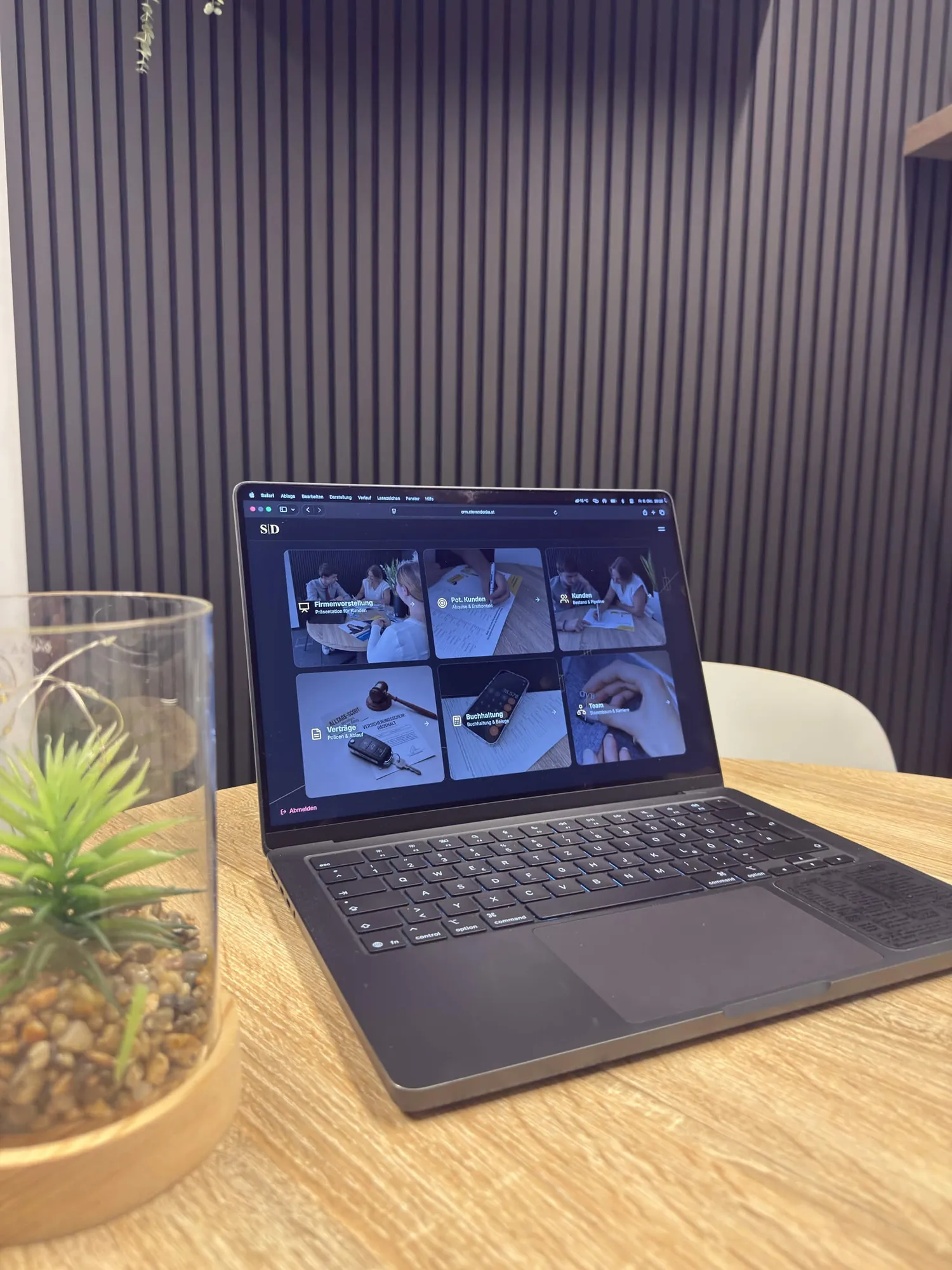

The full walkthrough with screen recordings and all features is on the project page.
from €799
The price depends on how many areas your CRM needs and what it connects to. After a conversation about your processes, you get a quote that fits exactly.
- Built around your processes, not a template
- Only the features you actually need
- Connected to your website, email, WhatsApp and calendar
- Expandable as your business grows
- Hosting and maintenance by Cevio if you like